Concept Statement:

A game set in space where you and your crew need to survive until you reach safe territory. You are in a frigate which you need to maintain operational while space pirates board your ship.
Genre(s):
Twin Stick-Shooter/Shoot em up
Unique Selling Points:
- CO-OP experience, coordinate with your fellow crewmates how to best survive the onslaught of space pirates
- Evolve your character in a per-match progression system
- Replayability through randomization of perks
Design choices:
A big component of this game was how could I make a fun co-op experience to play with friends.
There were two big inspirations for this project, the first one was “Among Us”, in particular I found the gameplay loop of having to do tasks in a map in order to win really interesting.
A big part of that is because inherently those tasks will make your crew split up, allowing for interesting decision making to naturally occur.
The second inspiration was “Killing Floor”, this is a wave-defense type game where you get incrementally stronger each round by buying/upgrading weapons but the enemies also get progressively stronger.
So the design intent when starting the project was to have a fun wave-defense style gameplay where you need to adapt to the different tasks the ship throws at you.
Core-Gameplay:
I’ll first start by showing this video, which will help me explain two components of the game, the first one is the camera, the second is the enemies.
Camera:
Surprinsingly doing a camera for a top-down game has some challenges, first of all objects will often obscure the player and enemies.
The way I decided to solve this was by adding a transparency effect for any objects that is between the camera and the player. This is really important as it allows the player to still keep track of its character in corridors that are perpendicular to the camera.
Another important aspect is the dither effects we see on characters, enemies will be shown to the camera with a red silhouette, this helps the player keep track of where enemies are even if the walls are not being “removed” from the player view.
There’s a few more problems with a top-down shooter, usually our inputs are a raycast from the camera onto where the player mouse is, however we can also have objects in the way of that.
There’s a secondary problem to that, is that even if you mark walls as “invisible” to the player’s raycast you might have instances where if you have a “valley” or anything that has a different height level it will now miscalculate completely where your character should be facing.
In the case of my game I have an invisible “plane” at each height level, the raycast ignores every object in the game and only colides with this plane, this makes the game really consistent on where you’re currently aiming.
Although that is not enough (non surprisingly), what happens if you are at the top of a stair case and you’re trying to shoot at an enemy coming up?
In this case we need something extra, in my case the character “breaks out” of its normal behavior and will snap to the enemy’s Y position instead. Effectively meaning that its not longer using these planes to aim but rather aiming directly at the enemy.
Enemies:
It was a surprinsingly fun problem to solve on how to make more interactive in the shooting. If your enemies are all doing similar behaviors you might soon find out that something is missing.
That something is keeping players challenged in interesting ways and having to problem solve on the go, as well as allowing players to feel mastery of the game through learning.
In this game the enemies have different behaviours or play patterns that incentivizes different targeting from the player.
Normal shooty enemy:
These enemies will keep their distance, look for cover and shoot you. They introduce the “bullet hell” in the game, this will make the player move to dodge bullets and seek cover behind objects.
It has some variants like Pistol, Rifle, Shotgun and Sword, those weapons add another layer of variety, for instance you’ll want to shoot the enemies with the shotgun first since they’ll be doing massive amounts of damage.
If they have a sword you’ll want to keep running and shooting!

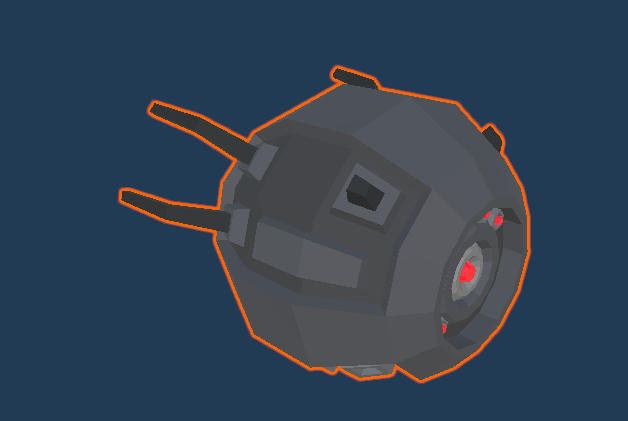
Drone – Normal variant:
These enemies will come up close and rotate around the player, this provides some aiming challenge.
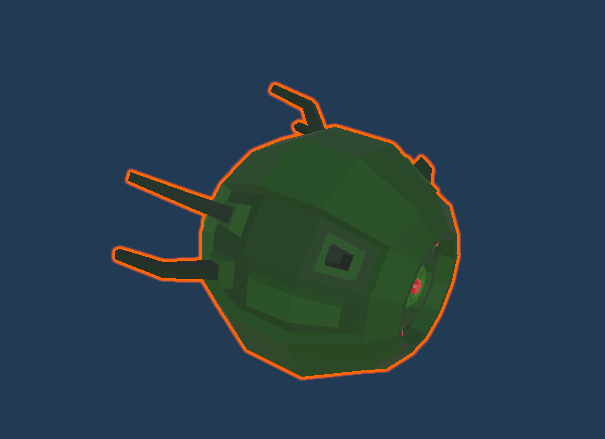
Drone – Poison variant:
These enemies will come up close and start spreading poison clouds, this disallows the player to stay in a location for a long duration of time and makes the them seek new cover.
Drone – Explosion variant:
These enemies will come up close and explode, this makes the player want to close doors and prioritize them over other enemies before they gap close.

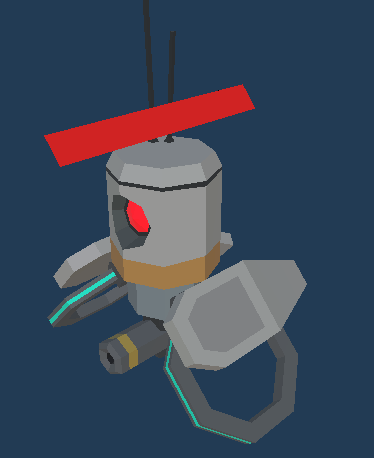
Drone – Healing variant:
These enemies will stay behind other characters and heal them, effectively giving the player a choice between trying to shoot down their target or first get rid of their healing.
Giant Robot:
A bullet sponge enemy with a powerful mini-gun, they give the enemies a chance to break through defenses players have set-up, they are slow so you can run around the map to avoid them.

Game Events:
Through a playthrough various events can happen that will require you and your squad to split up. Some events might even make one of you have to focus on the task at hand and stop supporting your crew against the pirates.
Another important aspect when doing these is the ramp-up in difficulty, perhaps at the start of the game you and your crew can all defend a certain location but as the game progresses multiple events start happening, making you have to split up to handle them.
Event #1 – Steer frigate
Your ship encounters an asteroid field, one of you needs to go to the bridge of the ship and control it.
Event #2 – Engine Failure
Your ship’s engine starts failing, someone needs to be allocated to the back of the ship.
Event #3 – Pirate Ships
Pirate ships try to attack your ship, you need someone on the cannons.
Weapon Classes:
While choosing what parts of the game to go over in this written piece I decided to go with one of the core systems, the weapons.
Here’s a short version of the class diagram in the game:
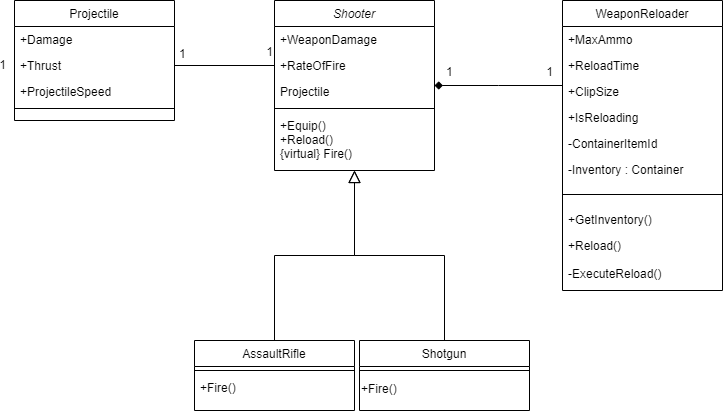
In this case our weapons all inherit from the Shooter class, this helps keep behavior that every weapon should have such as: shooting, reloading and damage in a parent class that every weapon can then inherent from.
Which allows us to adhere to some important SOLID principles, you’ll notice that Assault Rifle and Shotgun both inherit from Shooter, however a shotgun functions wildly different from an assault rifle.
Instead of shooting one projectile a shotgun could shoot 6 in a scatter motion.
With this sort of class breakdown we can keep the specific behaviors to the individual weapon thus we don’t need to change the Shooter class which should be closed for changes.
Another relevant class is the WeaponReloader class, this class is in charge of managing the clip of the weapon, we can ask this class questions such as “How many bullets do I have left in my clip?”.
Not only that but it manages the communication with an inventory system. Each weapon as a WeaponReloader with an unique ID, this allows us to grab ammo from the environment for specific weapons.
Each weapon can also have their own unique stats in terms of clip size and reload times.
Multiplayer
While many regrets were had with my choice to implement multiplayer in the game it was a great learning experience.
So the question is “How is multiplayer handled in the game?”
Code structure:
If you want to code a multiplayer game your code needs to be thought out with it in mind so that when you get to do it things are a lot easier.
In this case we first start with a class called InputController, the sole purpose of this class is to catch input from the player, this creates an important abstraction level.
In the InputController we have something like this:
    public class InputState

    {

        public float Vertical;
        public float Horizontal;
        public float aimPosX;
        public float aimPosY;
        public float aimPosZ;
        public bool Fire1;
        public bool Fire2;
        public bool IsReloading;
        public bool IsWalking;
        public bool IsSprinting;
        public bool IsCrouched;
        public float AimAngle;
        public bool IsInteracting;
        public bool isInMenu;
        public bool isUsingSword;
        public bool isSwinging;
        public bool throwGrenade;
        public bool UsedAbility1;
        public bool UsedAbility2;
        public bool UsedAbility3;
        public bool UsedAbility4;

    }
On update we check if the player did any of those actions as such:
    void Update()

    {

        State.Vertical = Input.GetAxis("Vertical");
        State.Horizontal = Input.GetAxis("Horizontal");
        MouseInput = new Vector2(Input.GetAxisRaw("Mouse X"), Input.GetAxisRaw("Mouse Y"));
        State.Fire1 = Input.GetButton("Fire1");
        State.Fire2 = Input.GetButton("Fire2");
        State.IsReloading = Input.GetKeyUp(KeyCode.R);
        State.IsWalking = Input.GetKey(KeyCode.LeftAlt);
        State.IsSprinting = Input.GetKey(KeyCode.LeftShift);
        State.IsCrouched = Input.GetKey(KeyCode.C);
        MouseWheelUp = Input.GetAxis("Mouse ScrollWheel") > 0;
        MouseWheelDown = Input.GetAxis("Mouse ScrollWheel") < 0;
        State.aimPosX = Input.mousePosition.x;
        State.aimPosY = Input.mousePosition.y;
        State.aimPosZ = Input.mousePosition.z;
        State.IsInteracting = Input.GetKeyUp(KeyCode.E);
        State.isInMenu = Input.GetKeyUp(KeyCode.P);
        State.throwGrenade = Input.GetKeyUp(KeyCode.G);
        State.UsedAbility1 = Input.GetKey(KeyCode.Alpha1);
        State.UsedAbility2 = Input.GetKey(KeyCode.Alpha2);
        State.UsedAbility3 = Input.GetKey(KeyCode.Alpha3);
        State.UsedAbility4 = Input.GetKey(KeyCode.Alpha4);

    }
However it’s not enough to just keep track of player input, this InputController class is in fact part of a bigger class called PlayerState, PlayerState keeps track of other states such as movement and weapons:
    public enum EMoveState

    {

        WALKING,
        RUNNING,
        CROUCHING,
        SPRINTING,
        ONAIR,
        INTERACTING
    }


    public enum EWeaponState
    {
        IDLE,
        FIRING,
    public enum EMoveState
    {
        WALKING,
        RUNNING,
        CROUCHING,
        SPRINTING,
        ONAIR,
        INTERACTING
    }


    public enum EWeaponState
    {

        IDLE,
        FIRING,
        AIMING,
        AIMEDFIRING,
        RELOADING
    }


    public EMoveState MoveState;
    public EWeaponState WeaponState;


    private InputController m_InputController;
    public InputController InputController
    {
        get
        {
            if (m_InputController == null)
                m_InputController = gManager.InputController;

            return m_InputController;
        }
    }
With this other level of abstraction we can start thinking on what to send over the network.
Starting with the player inputs, the above is fine for a singleplayer game but its missing information. Many things can happen that cause a desync between computers if we are just sending what the players clicked.
In a networked game there are delays from player A to player B, so in player A’s view if they received a “go left” from player B and an enemy puts itself in the way, player A’s computer might calculate that player B goes slighly down and left.
However in player B’s computer the enemy is ever so slightly in a different position, one of the reasons being it just hasn’t received the latest network packet. In this scenario Player B’s computer now might calculate that its position goes slightly up and to the left. Both players are now desynced and will experience different things.
As such we’ll add some new more information to send over, we call this the NetworkState class, this class inherits from InputController.InputState but adds a few important fields, namely the position:
    public partial class NetworkState : InputController.InputState
    {
        public float PositionX;
        public float PositionY;
        public float PositionZ;
        public Quaternion rotation;
        public float RotationAngleY;
        public float TimeStamp;
    }
Using Photon we can then send something like this over the network:
public void OnPhotonSerializeView(PhotonStream stream, PhotonMessageInfo info)
    {
        if (stream.IsWriting)
        {
            stream.SendNext(this.m_Body.position);
            stream.SendNext(this.m_Body.rotation);
            if (this.m_SynchronizeVelocity)
                stream.SendNext(this.m_Body.velocity);

            if (this.m_SynchronizeAngularVelocity)

                stream.SendNext(this.m_Body.angularVelocity);

            stream.SendNext(localAimPos.x);
            stream.SendNext(localAimPos.y);
            stream.SendNext(localAimPos.z);
            stream.SendNext(state.Fire1);
            stream.SendNext(state.Fire2);
            stream.SendNext(gManager.LocalPlayer.PlayerAnimation.isReloading);
            stream.SendNext(state.IsWalking);
            stream.SendNext(state.IsSprinting);
            stream.SendNext(state.IsCrouched);
            stream.SendNext(gManager.LocalPlayer.PlayerAnimation.isUsingSword);
            stream.SendNext(gManager.LocalPlayer.PlayerAnimation.isSwinging);
            stream.SendNext(gManager.LocalPlayer.PlayerAnimation.isThrowingGrenade);
        }
The road doesn’t end here, this will keep players in sync but player A and player B will see each other in a very “choppy” way, this is because a game might be running at 120 frames and you are only receiving network updates at 20 times per second.
So now the first solution to this could be increasing the amount of packets we are sending over the network. While this might seem like a good solution we soon run into network “performance” problems of sending too many packets, especially as you scale the game to more players.
This is where some “guessing” and lerping comes in.
When we receive packet A and then receive packet B, we don’t instantly change the position or rotation right away.
Instead we grab the values and smoothly transition them between one another, this allows us for both players to see each other in a smooth way and not overflow game instances with network packets.
    private void FixedUpdate()
    {
        if (!player.PlayerHealth.isAlive)
            return;
        if (photonView.IsMine)
            return;


        this.m_Body.position = Vector3.MoveTowards(this.m_Body.position, this.m_NetworkPosition, this.m_Distance * (1.0f / PhotonNetwork.SendRate));

        this.m_Body.rotation = Quaternion.RotateTowards(this.m_Body.rotation, this.m_NetworkRotation, this.m_Angle * (1.0f / PhotonNetwork.SendRate) * 10);

        //Smooth over the aim
        Vector3 aimTmp = new Vector3(this.state.aimPosX, this.state.aimPosY, this.state.aimPosZ);

        Vector3 aimTmpNetwork = new Vector3(this.m_NetworkAimPosX, this.m_NetworkAimPosY, this.m_NetworkAimPosZ);

        aimTmp = Vector3.MoveTowards(aimTmp, aimTmpNetwork, Vector3.Distance(aimTmp, aimTmpNetwork) * (changeSpeedAimingSmoothness / PhotonNetwork.SendRate));

    }
That more or less wraps up my limited explaining of keeping players in sync but keep in mind that’s not the only thing that needs syncing.
The game also has AI with randomization in its actions, so how do we keep NPC’s synced?
In this particular instance only the host is calculating what the AI does and sending their information over to other players, effectively meaning that the host is running the brains of the AI’s, this of course means the host in general needs to have a better computer than the other players!
For those that stuck around here’s some gameplay with two players:
 [miguel_marinheiro]